How Do I fix that annoying beep in Vista from PC Speaker
Have you noticed after installing Vista that for programs that don't have a wav file associated with certain notification sounds you get a really loud beep sound from your computers PC speaker.
Even if you mute the PC speaker in the sound control panel it still persists...
Here is the solution:
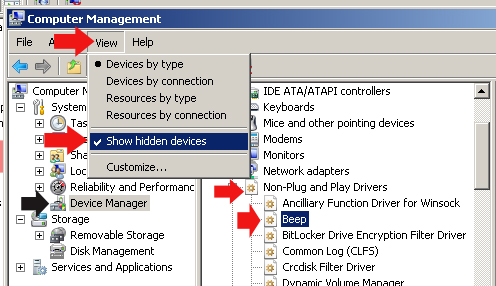
1. Open your device manager (In Vista, you can just type "device manager" in the search box from the start menu and press enter)
for the next steps click read morebelow
2. Then from the then from the top menu Select "View->Show Hidden devices"
3. Then click on Non- Plug and Play Devices
4. Double Click on "Beep"
5. Click on the "Driver tab
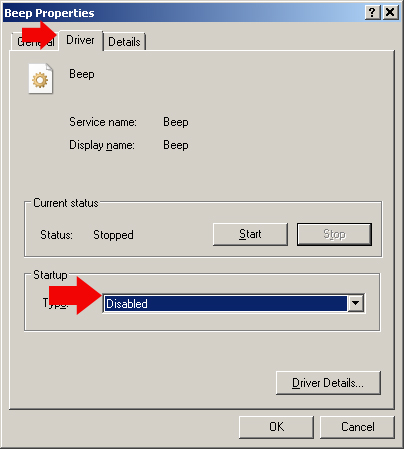
6. Change the "Start Up Type" to "Disabled" from the drop down menu, click the "stop" button or restart your pc... "poof" no more annoying beeping. Just for kicks, try calling Microsoft support asking how to disable your PC speaker and see what they tell you... not sure all the support techs know this one yet. This also works for XP.