Open Notepad .txt Text File at the Last Location it was Edited with a TimeStamp
Here little known trick to set notepad to automatically insert the Date and Time after each update to a specific file. No it doesn't involve a regkey or special shortcut file.
Here is how:
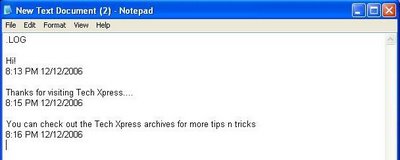
1. Open a Notepad Text file.
2. Type ".LOG" in the first line.(See picture above)
3. That's it. Now Notepad will add Date and Time whenever you reopen the file.
Also, if you just want to add Date and Time while the file is open, Press F5. The Timestamp will be added automatically.