Crystal Reports Update Datasource Fails
When updating the Datasource to a Crystal Report, I noticed that even though data was populating from the correct source that the report would still try to authenticate with the old datasource.
The solution to this is to simply remove the old unused datasource from your "My Connections" list.
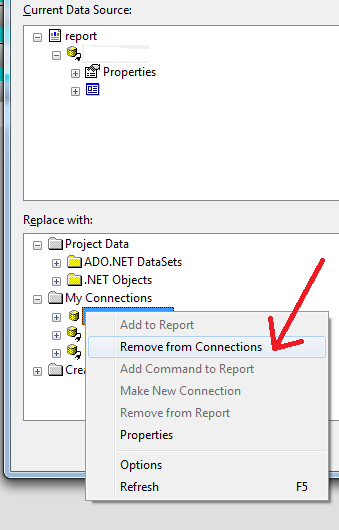
Something not exactly clear in the Crystal Reports for Visual Studio 2010 documentation is moving from integrated security to manual userID and password for your datasource connection code.
If you remove the old integrated datasource from your report and then add it again with out the integrated option checked, it will again default to integrated security.
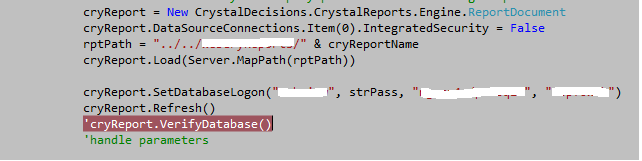
There might be a way to get the IntegratedSecurtiy property of the DataSourceConnections array to work but I was unsuccessful.
I ended up adding a new connection with a custom "Integrated Security" property set with the value of "False".
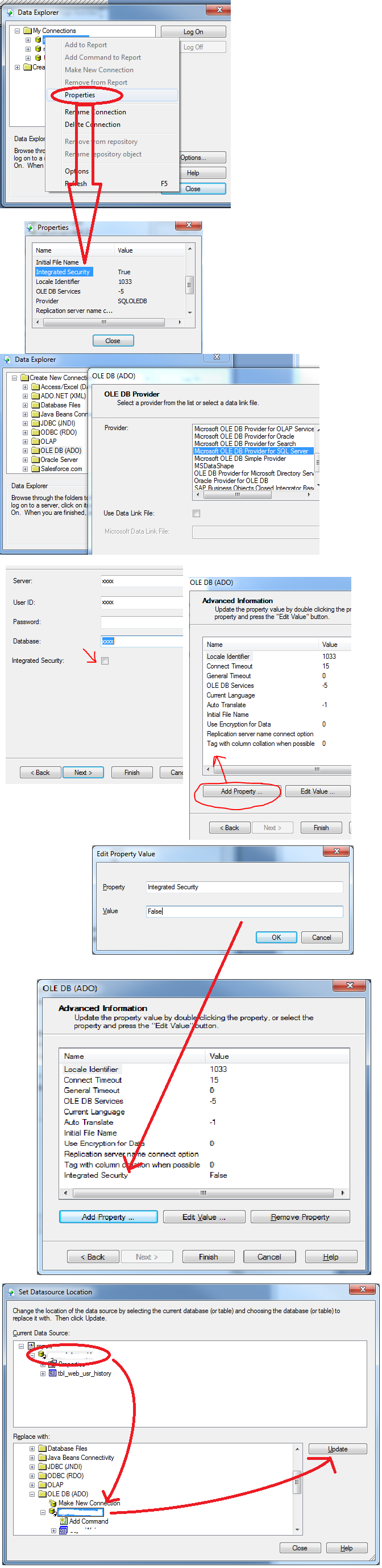
After adding the new Datasource Connection, you will need to click -> OLD connection -> the NEW connection -> the UPDATE button and then close.
This should eliminate this exception:
CrystalDecisions.CrystalReports.Engine.LogOnException occurred
Message=Database logon failed.
Source=CrystalDecisions.ReportAppServer.DataSetConversion
StackTrace:
at CrystalDecisions.ReportAppServer.ConvertDotNetToErom.ThrowDotNetException(Exception e)
at CrystalDecisions.ReportSource.EromReportSourceBase.ExportToStream(ExportRequestContext reqContext)
at CrystalDecisions.CrystalReports.Engine.FormatEngine.ExportToStream(ExportRequestContext reqContext)
at CrystalDecisions.CrystalReports.Engine.ReportDocument.ExportToStream(ExportOptions options)
at CrystalDecisions.CrystalReports.Engine.ReportDocument.ExportToHttpResponse(ExportOptions options, HttpResponse response, Boolean asAttachment, String attachmentName)
at ClassCrystalReports.subOpenCrystalRpt(String cryReportName, String strRptFormat) in W:\App_Code\ClassCrystalReports.vb:line 193
InnerException: System.Runtime.InteropServices.COMException
ErrorCode=-2147217393
Message=Database logon failed.
Source=Analysis Server
StackTrace:
at CrystalDecisions.ReportAppServer.Controllers.ReportSourceClass.Export(ExportOptions pExportOptions, RequestContext pRequestContext)
at CrystalDecisions.ReportSource.EromReportSourceBase.ExportToStream(ExportRequestContext reqContext)
InnerException: