How Do I Automatically Move an Email from Someone to an Outlook Folder?
How do I automatically move an email from someone in Microsoft Outlook to a folder automatically?
Microsoft created something called a " rule " to do this task.
You can organize your email messages more efficiently if you have a proper set of Outlook rules setup.
Here is how to setup a basic rule to move all emails from paypal account to accounts folder:
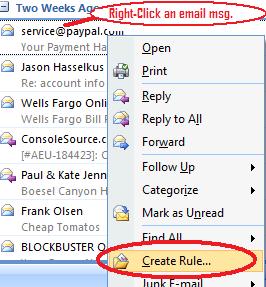
- From your Outlook Inbox, right-click a message from someone you would like to create a rule.
- Select create rule.
-
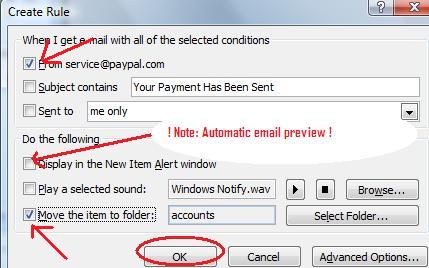
Click the From check box.- Click the Move the item to folder: check box.
(If you have never created a rule before, it will automatically open the New Folder dialog box. Otherwise it will default to the last location you created a rule. If you want to change it you must click the Select Folder... button.). 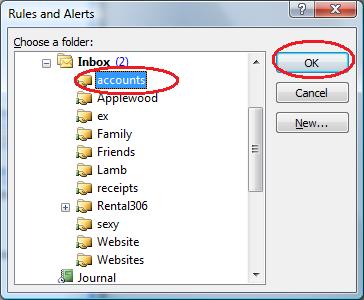
- Click on an existing folder or click the New... button;
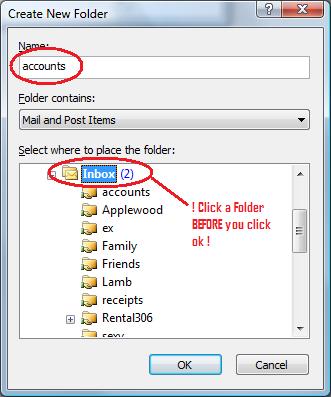
- ! NOTE ! Click on a folder in the list first so that you don't create a sub-folder by accident. Usually you want to click Inbox.
- In the Name: field, type a name for the new folder and click OK
- Click OK on the Rules and Alerts dialog making sure that the correct destination folder was selected.
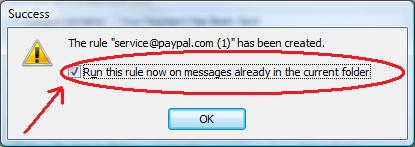
- Click OK again on the Create Rule dialog and be sure to check the Run this rule now on the messages already in the current folder if you want the rule to move the emails that you already received from that person.